The Hidden Flaws in Default Squarespace Color Themes (And How to Fix Them)
When you launch a new website, it is easy to assume that the out-of-the-box design settings are optimized for success. Each Squarespace template comes with 10 built-in color themes, but unfortunately, many of these Squarespace default color themes are not just boring—they are technically flawed.
Choosing a professional web color palette is not as easy as it looks. If a naive website designer tries to apply custom colors to a theme without understanding design principles, they often make the mistake of choosing colors with poor contrast, resulting in severe website accessibility issues.
Examples of Squarespace Default Color Schemes Failing WCAG Contrast Ratios
The default Bright 1 color theme in Squarespace applies several low-contrast color combinations that fail WCAG accessibility standards. For example, the carousel card background (#A8A6A1) paired with its description text (#F7F7F7) produces a color contrast ratio of only 1.48:1, while the section background (#F7F7F7) with text (#A8A6A1) reaches just 2.03:1. Both fall far below the WCAG minimum requirements, resulting in poor readability, weak visual hierarchy, and a suboptimal user experience.
Another glaring example can be seen in the built-in Dark 1 color theme. This theme uses a #38383B background paired with #A8A6A1 for linked text and highlights. This combination yields a contrast ratio of just 4.8:1, which fails to meet the strict 7:1 ratio required by WCAG Level AAA for normal text.
How Poor Color Contrast Hurts Your SEO
Proper color contrast is about much more than just aesthetics; it is a critical ranking factor. Search engines prioritize user experience. The Google Lighthouse tool easily identifies low color contrast ratios, which can actively penalize your site and severely damage your search engine optimization (SEO) efforts.
As highlighted in a prominent Mozilla developer article:
"It is good to have a cool design on your website, but the design is worthless if your users can't read your content.... the color contrast between background and foreground content should be great enough to ensure legibility."
Squarespace Color Themes: Default vs. Professional Custom Palettes
Squarespace Default Color Themes ↓
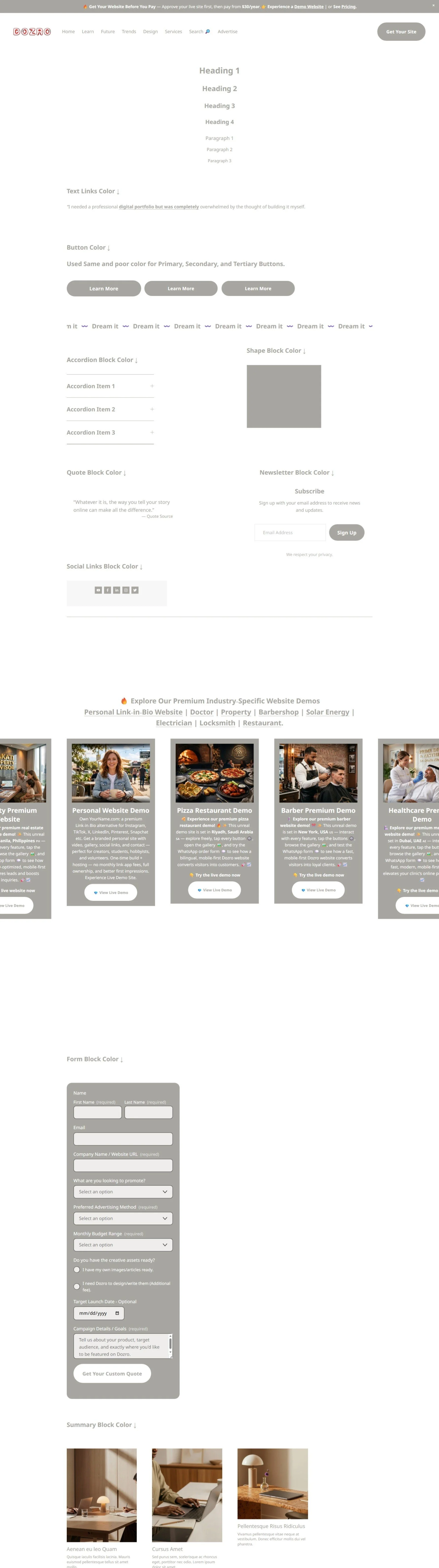
Squarespace Default Color Theme: Poor WCAG Contrast Colors
Squarespace Custom Color Themes by Dozro ↓
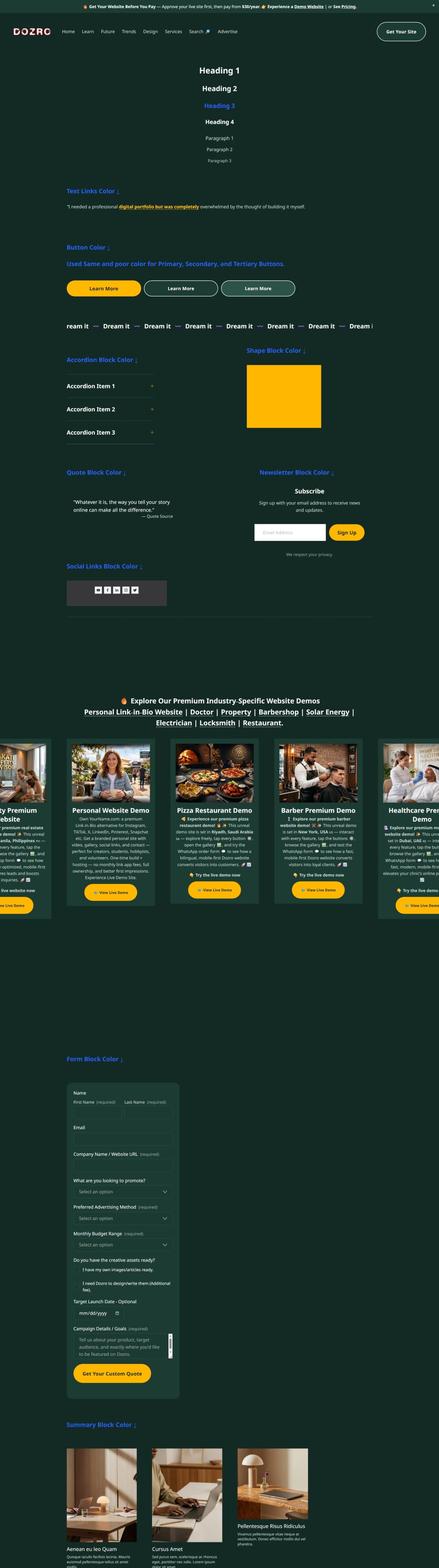
Squarespace Customized Color Theme by Dozro: Perfect WCAG Contrast Colors and Clear Readability
Squarespace Custom Color Themes by Dozro ↓
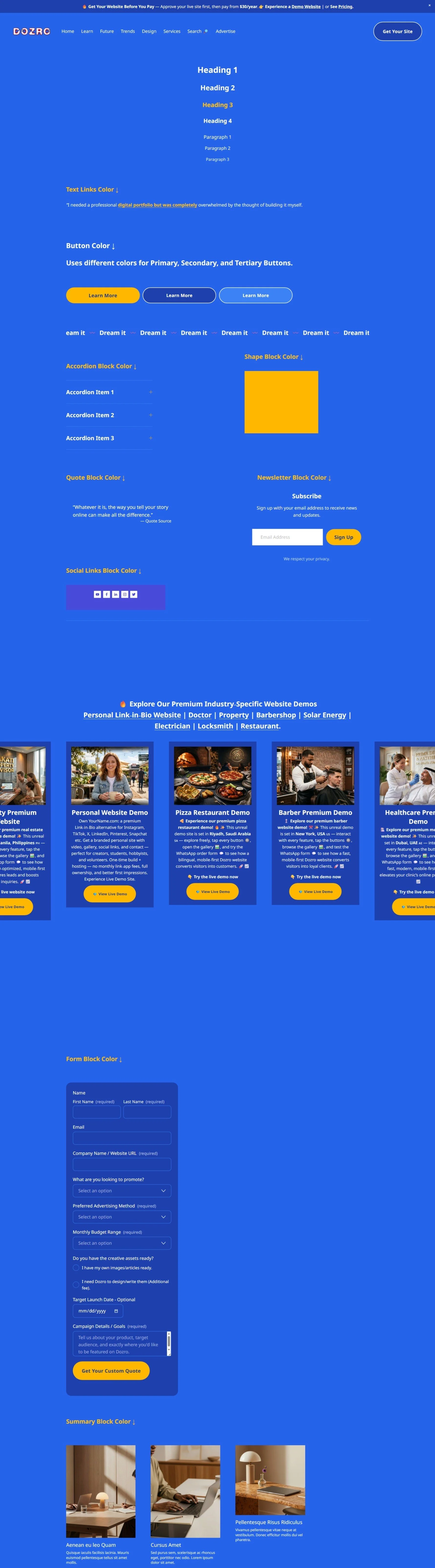
Squarespace Customized Color Theme by Dozro: Perfect WCAG Contrast Colors and Clear Readability
The Dozro Solution: Professionally Tweaked Custom Themes
These accessibility issues highlight exactly why professionally tweaked color themes are essential for modern websites. In the video above, we demonstrate the massive difference between a poorly configured default layout and a custom Dozro theme.
When you upgrade your Squarespace color settings with a professional palette, you instantly improve your digital architecture:
Distinct Button Hierarchy: Instead of using the exact same washed-out color for Primary, Secondary, and Tertiary buttons, our custom themes apply beautiful, visually distinct variant colors so visitors know exactly where to click.
Scroll-Stopping Headings: We apply highly legible colors to all headings and paragraphs, utilizing a dedicated accent color for Heading 3 to catch the reader's eye.
Optimized Blocks: Every element—from the accordion and shape blocks to the quote, newsletter, and social links blocks—is given a sophisticated, high-contrast color scheme that looks premium and modern.
100% WCAG Passed: Every single color combination is rigorously tested to ensure flawless readability and maximum SEO compliance.
Upgrade Your Website Today
You don't have to settle for the default options. There are millions of web colors available, and you can easily change them in your site styles. However, manually tweaking every single color setting across a theme can take up to 12 hours of tedious work.
Do it yourself for free: We have made it easy for you. You can copy the exact hex codes completely free!
👉 Copy our professionally crafted WCAG-passed Squarespace Button Colors.
Let the experts handle it: Don't have the time? The Dozro team is ready to perfectly configure your site's color architecture for you, ensuring your website looks stunning and ranks beautifully. 👉 Hire Dozro to Professionally Customize Your Squarespace Site.
🌐 See Squarespace in Action: Explore Live Demo Websites
Both Dozro.com and our subsidiary WOZRO.com are built entirely on the Squarespace CMS platform. If you want to see what is possible with advanced Squarespace design, explore our fully interactive, industry-specific live demo websites:
🍕 Restaurant Demo: Experience a high-converting, mobile-first food menu layout at our Premium Pizza Restaurant Live Demo.
👤 Personal / Creator Demo: See an edge-to-edge, distraction-free digital profile at our Personal Website & Premium Link-in-Bio Demo.
🚀 Explore All Demos: Browse our complete catalog of industry-ready websites at WOZRO.com.
Explore More Resources
Get Squarespace Website Design Package on Turnkey Basis.
Explore Our Premium Custom Squarespace Color Themes for Your Website.
Squarespace website live training sessions in one to one private classes.
Squarespace website SEO Services.
How to Change Squarespace Colors for All Major Blocks: Buttons, Forms, Carousel, Text, Social Links, Newsletter, Announcement Bar, Line, Links, Scrolling Text, Logo on Different Pages, Section Background, and Change Color Palette.
How to Set Up Squarespace Custom Branded Colors to Match Your Exact Brand Colors.
Download FREE Banners for Facebook, or YouTube, or other Social Media, or Advert Flyers.
Check Dozro Services List or visit the Homepage of our website.
Be sure to check out Dozro's social media platforms, including our YouTube channel and Facebook page.